Hyperparameter search
We can use the Python API to iteratively run a workflow with different injected variables.
[1]:
import alpine as AlpineAPI
[2]:
from pprint import pprint
import json
import seaborn as sns
import matplotlib.pyplot as plt
%matplotlib inline
Connection information
[3]:
filename = "alpine_login.conf"

with open(filename, "r") as f:
    data = f.read()

conn_info = json.loads(data)

host = conn_info["host"]
port = conn_info["port"]
username = conn_info["username"]
password = conn_info["password"]
Create a session and log in
[4]:
session = AlpineAPI.APIClient(host, port, username, password)
[5]:
pprint(session.workfile.get(701), depth = 2)
{u'response': {u'associated_worklets': [],
               u'comment_count': 0,
               u'complete_json': True,
               u'dataset_ids': [],
               u'description': u'',
               u'entity_subtype': u'alpine',
               u'entity_type': u'workfile',
               u'execution_locations': [...],
               u'file_name': u'Random Forest Parameter Search',
               u'file_type': u'work_flow',
               u'id': 701,
               u'is_deleted': None,
               u'latest_version_id': None,
               u'link_url': None,
               u'owner': {...},
               u'recent_comments': [],
               u'status': u'idle',
               u'tags': [],
               u'user_modified_at': u'2017-02-28T21:35:54Z',
               u'version_info': {...},
               u'workspace': {...}}}
Running a workflow and downloading the results
[6]:
workflow_id = 701
[7]:
process_id = session.workfile.process.run(workflow_id)

session.workfile.process.wait_until_finished(workflow_id,
                                             process_id,
                                             verbose=True,
                                             query_time=5,
                                             timeout=1000)
Workflow in progress for ~242.5 seconds.
[7]:
u'SUCCESS'
[8]:
flow_results = session.workfile.process.download_results(workflow_id, process_id)
pprint(flow_results['outputs'], depth = 2)
[{u'isGenerateReport': True,
  u'node_meta_info': [...],
  u'out_id': 1493155451032.9402,
  u'out_title': u'magic04.csv',
  u'visualData': {...},
  u'visualType': 0},
 {u'isGenerateReport': True,
  u'node_meta_info': [...],
  u'out_id': 1493155489783.9727,
  u'out_title': u'Random Sampling',
  u'visualData': [...],
  u'visualType': 6},
 {u'isGenerateReport': True,
  u'node_meta_info': [...],
  u'out_id': 1493155499187.6677,
  u'out_title': u'Test Set',
  u'visualData': {...},
  u'visualType': 0},
 {u'isGenerateReport': True,
  u'node_meta_info': [...],
  u'out_id': 1493155506846.1965,
  u'out_title': u'Train Set',
  u'visualData': {...},
  u'visualType': 0},
 {u'isGenerateReport': True,
  u'node_meta_info': [...],
  u'out_id': 1493155616276.4927,
  u'out_title': u'Alpine Forest Classification',
  u'visualData': [...],
  u'visualType': 6},
 {u'isGenerateReport': True,
  u'out_id': 1493155680415.3167,
  u'out_title': u'Confusion Matrix',
  u'visualData': [...],
  u'visualType': 6}]
The downloaded results file is a summary of all the operator output in the workflow. In particular, it is a JSON file that we can manipulate or save to disk.
[9]:
outfile = "Results_File_N_Trees_{}.fr".format(str(50))

with open(outfile, "w") as f:
    json.dump(flow_results, f)
Parsing workflow results
When we convert the downloaded results to a Python object we get a nested dictionary/list object. Here we’re pulling two values out of the results:
- The overall prediction accuracy. This comes from the Confusion Matrix operator.
- The number of trees. This comes from the Alpine Forest Classification operator.
This function parses the file to return those two values.
[10]:
def parse_flow_results(workflow_id, process_id):
    flow_results = session.workfile.process.download_results(workflow_id, process_id)

    # Get accuracy from the confusion matrix
    conf_matrix_data = session.workfile.process.find_operator('Confusion Matrix', flow_results)
    acc = float(conf_matrix_data['visualData'][0]['visualData']['items'][2]['Class Recall'].split()[1])

    # Get number of trees from the Alpine Forest
    alpine_forest_data = session.workfile.process.find_operator('Alpine Forest Classification', flow_results)
    N = int(alpine_forest_data['visualData'][2]['visualData']['items'][0]['Average over All Trees'])

    return (N, acc)
Workflow variables
Variables with different values can be inserted into workflows. They have to be formatted as below and are passed as an optioned argument to the workflow run method.
[11]:
ntrees = [5,10,25,50,75]
variables = [[{"name": "@n_trees", "value": str(N)}] for N in ntrees]
[12]:
variables
[12]:
[[{'name': '@n_trees', 'value': '5'}],
 [{'name': '@n_trees', 'value': '10'}],
 [{'name': '@n_trees', 'value': '25'}],
 [{'name': '@n_trees', 'value': '50'}],
 [{'name': '@n_trees', 'value': '75'}]]
Run the workflow in a loop, extracting test accuracy
[15]:
test_acc = []

for variable in variables:
    print("Running with workflow variable: {}".format(variable))
    process_id = session.workfile.process.run(workflow_id, variables=variable)
    session.workfile.process.wait_until_finished(workflow_id, process_id, verbose=True, query_time=5, timeout=1000)

    (N, acc) = parse_flow_results(workflow_id, process_id)
    test_acc.append(acc)

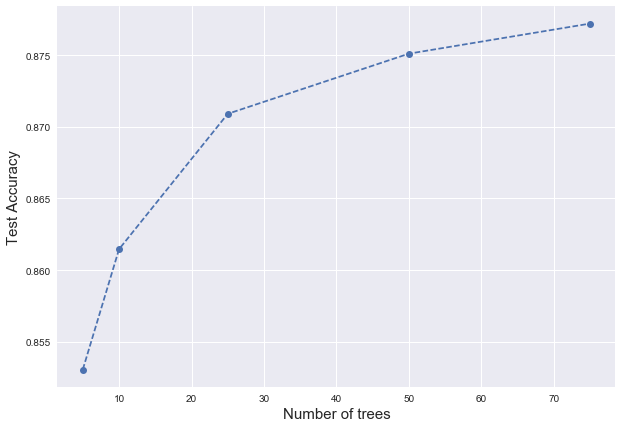
    print("For {} trees, test accuracy is {}".format(N, acc))
    print("")
Running with workflow variable: [{'name': '@n_trees', 'value': '5'}]
Workflow in progress for ~191.1 seconds.
For 5 trees, test accuracy is 0.8530647

Running with workflow variable: [{'name': '@n_trees', 'value': '10'}]
Workflow in progress for ~207.0 seconds.
For 10 trees, test accuracy is 0.861461

Running with workflow variable: [{'name': '@n_trees', 'value': '25'}]
Workflow in progress for ~250.3 seconds.
For 25 trees, test accuracy is 0.8709068

Running with workflow variable: [{'name': '@n_trees', 'value': '50'}]
Workflow in progress for ~311.6 seconds.
For 50 trees, test accuracy is 0.875105

Running with workflow variable: [{'name': '@n_trees', 'value': '75'}]
Workflow in progress for ~363.1 seconds.
For 75 trees, test accuracy is 0.877204
[16]:
plt.figure(figsize = (10,7))
plt.plot(ntrees, test_acc, "o--")
plt.xlabel("Number of trees", size=15)
plt.ylabel("Test Accuracy", size=15);
[ ]: